

Nissan Dashboard Symbols and Meanings: What Your Warning Lights Mean
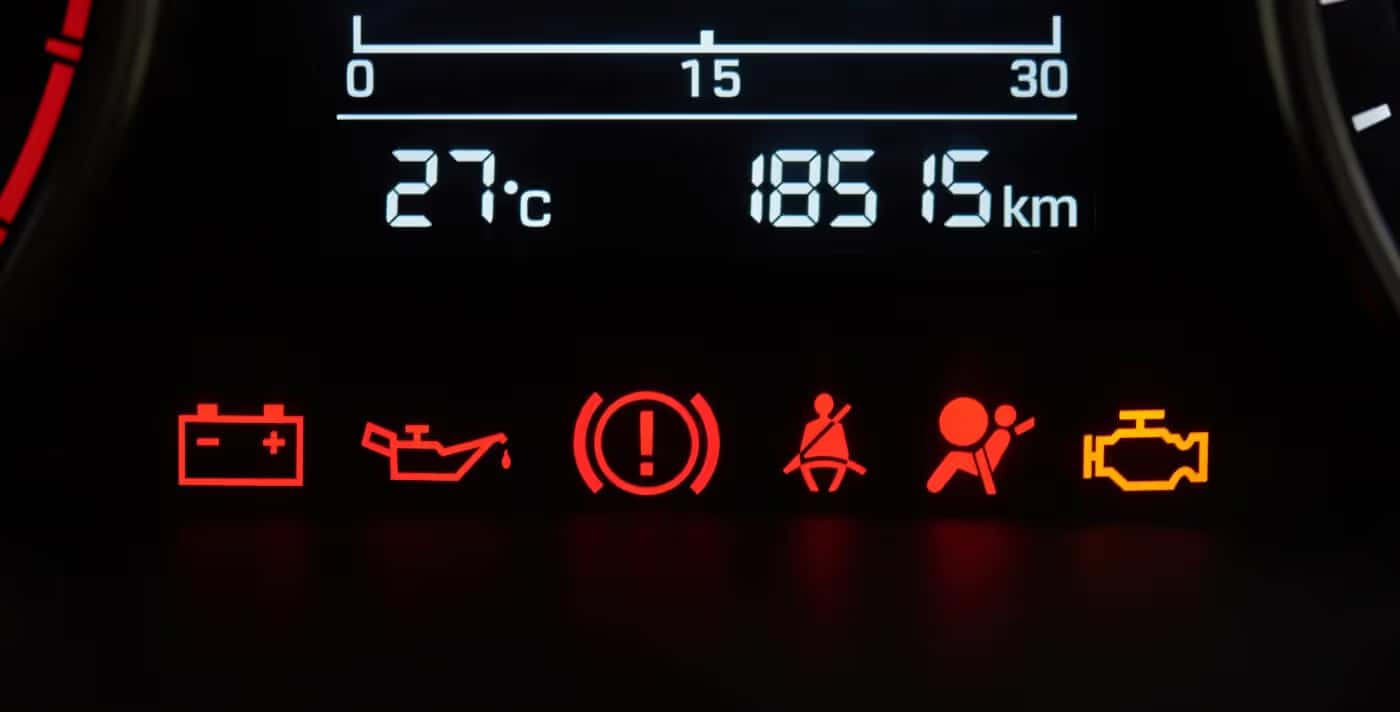
What Your Nissan Dashboard Warning Lights Mean and When to Schedule Service
When a dashboard light appears in your Nissan, the color, symbol, and vehicle behavior can help you decide whether to keep driving, pull over safely, or schedule service.
Quick Answer: Nissan dashboard symbols tell you whether a system is active, needs attention, or may require immediate service. Red Nissan warning lights usually mean you should stop driving when safe or get help right away. Yellow or orange lights usually mean your Nissan should be inspected soon. Green and blue lights are usually informational. If a warning light is red, flashing, appears with smoke, overheating, hard steering, weak braking, shaking, or loss of power, pull over safely and contact Nissan of Vero Beach before continuing.
When a dashboard light appears in your Nissan, it is your vehicle’s way of telling you something needs attention. Some Nissan dashboard symbols are simple reminders, while others can point to a safety, engine, brake, tire, battery, oil pressure, cooling system, or electrical issue that should be checked quickly.
If you are driving around Vero Beach, Fort Pierce, Sebastian, Indian River County, or the Treasure Coast and a Nissan warning light comes on, this guide can help you understand what the icon may mean, how serious it is, and what to do next. For a precise diagnosis, the certified Nissan service team at Nissan of Vero Beach can inspect your vehicle and help you get back on the road with confidence.
Definition: Nissan dashboard symbols are visual alerts shown in the instrument cluster or vehicle information display. They can identify active systems, maintenance reminders, safety warnings, sensor concerns, tire pressure issues, brake problems, engine faults, battery charging problems, or urgent stop-driving conditions.
Important Safety Note: This guide is a general reference. Dashboard icons and messages can vary by Nissan model, trim, model year, and equipment. Always check your Owner’s Manual for your exact vehicle. If a red or flashing warning light appears with drivability symptoms, stop driving when safe and request professional guidance.
What Do Nissan Dashboard Symbols Mean?
Nissan dashboard symbols tell you whether a vehicle system is active, needs attention, or may require immediate service. Red warning lights usually mean you should stop driving or get help right away. Yellow or orange lights usually mean your Nissan should be inspected soon. Green and blue lights are usually informational and show that a feature is active.
Because dashboard icons can vary by Nissan model, trim, and model year, your Owner’s Manual is always the best reference for your exact vehicle. However, most common Nissan dashboard lights follow the same warning light color system and service logic.
| Light Color | Typical Meaning | Urgency | Best Next Step |
|---|---|---|---|
| Red | Potential safety, engine, brake, battery, oil pressure, or temperature concern | High or urgent | Pull over safely when needed and request guidance |
| Yellow or Orange | System needs attention, diagnosis, or service soon | Moderate, unless flashing or paired with symptoms | Schedule service and monitor vehicle behavior |
| Green or Blue | System or feature is active | Usually informational | No service needed unless the feature does not work correctly |
| Flashing Light | Active fault, misfire, system intervention, or urgent attention depending on icon | Often high | Reduce speed, avoid hard driving, and schedule diagnosis quickly |
What Nissan Dashboard Light Colors Mean
Red Nissan Dashboard Lights
A red Nissan warning light usually means the issue needs immediate attention. Red lights may involve braking, oil pressure, engine temperature, battery charging, or another system that can affect safety or vehicle operation. If a red light appears while driving, pull over safely when needed and contact a service professional.
Yellow or Orange Nissan Dashboard Lights
A yellow or orange dashboard light usually means a system needs to be checked soon. This can include the check engine light, ABS light, low tire pressure light, traction control light, driver-assistance alerts, or emissions-related warnings. Some yellow lights are less urgent than red lights, but they should not be ignored.
Green or Blue Nissan Dashboard Lights
Green and blue lights are usually informational. They often indicate that a feature is active, such as high beams, exterior lights, turn signals, cruise control, or another driver-assistance function. These lights typically do not mean something is wrong.
Local Driving Tip: In Florida heat, stop-and-go traffic, heavy rain, and Treasure Coast humidity can make tire pressure, battery, charging system, and engine temperature warnings more common. If a warning light appears during hot weather or rain, pay close attention to how the vehicle feels before continuing.
Most Serious Nissan Warning Lights
Some Nissan warning lights are more urgent than others. If any of the following dashboard lights come on, take action right away or schedule Nissan service in Vero Beach as soon as possible.
- Engine oil pressure warning light: Low oil pressure can cause severe engine damage. Pull over safely and turn off the engine if this light comes on while driving.
- Brake warning light: This may indicate the parking brake is engaged, brake fluid is low, or the brake system needs attention.
- Engine temperature warning light: This may mean the engine is overheating. Continuing to drive can cause expensive damage.
- Battery or charge warning light: This may point to a charging system issue involving the battery, alternator, belt, wiring, or related components.
- Flashing check engine light: A blinking malfunction indicator light may indicate an engine misfire or condition that can damage emissions components.
- Airbag warning light: If this light stays on or flashes, the airbag or seat belt pretensioner system may need service.
- Power steering warning light: If steering becomes heavy or unpredictable, stop driving when safe.
For drivers near Vero Beach, Fort Pierce, Sebastian, Indian River County, and the Treasure Coast, Nissan of Vero Beach can inspect urgent warning lights and help determine whether your vehicle is safe to drive. If you are unsure whether it is safe to continue driving, contact our team before going farther.
Nissan Warning Light Quick Reference
Use this quick reference guide to understand common Nissan dashboard lights, how urgent they may be, and what to do next.
Oil Pressure Light
Typical Color: Red
Urgency: Urgent
What To Do: Pull over safely, turn off the engine, and request service guidance.
Brake Warning Light
Typical Color: Red or Yellow
Urgency: Urgent if red or paired with brake symptoms
What To Do: Check the parking brake. If the light stays on, schedule brake service.
Engine Temperature Light
Typical Color: Red
Urgency: Urgent
What To Do: Pull over safely and let the engine cool before continuing.
Battery or Charge Light
Typical Color: Red
Urgency: High
What To Do: Drive only as needed to reach a safe location or service center.
Check Engine Light
Typical Color: Yellow or Orange
Urgency: Moderate to urgent if flashing
What To Do: Tighten the gas cap. If the light stays on or flashes, schedule diagnostics.
TPMS Light
Typical Color: Yellow
Urgency: Moderate
What To Do: Check tire pressure and inspect for visible tire damage.
ABS Light
Typical Color: Yellow
Urgency: Moderate
What To Do: Schedule service soon. Regular braking may still work, but ABS may be disabled.
Airbag Warning Light
Typical Color: Red or Yellow
Urgency: High
What To Do: Have the safety system inspected as soon as possible.
Warning Light Still On?
If your Nissan dashboard warning light stays on, comes back, flashes, or appears with unusual vehicle behavior, our service team can inspect it.
Common Nissan Dashboard Symbols and Meanings
Nissan dashboard symbols can vary by model year and trim level, so your Owner’s Manual is always the best source for your exact vehicle. However, the warning lights below are among the most common Nissan dash symbols drivers may see.
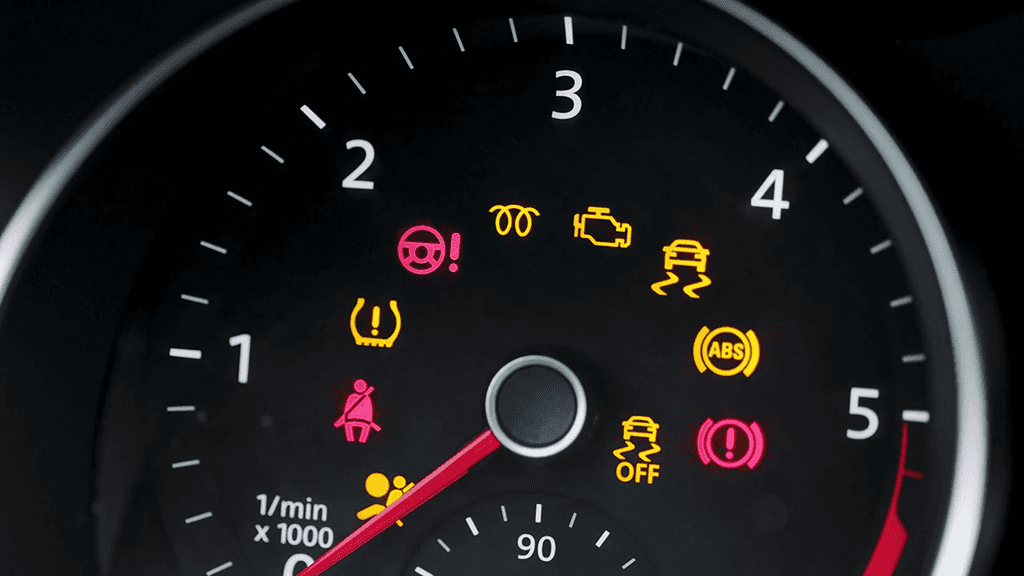
Check Engine Light or Malfunction Indicator Light
- What it looks like: An engine-shaped icon, sometimes labeled “check.”
- What it means: Your Nissan may have detected an emissions, fuel, ignition, sensor, or engine performance issue.
- What to do next: Check that your gas cap is tightened. If the light stays on, schedule a diagnostic appointment. If it flashes, reduce speed and have the vehicle checked right away.
- Can you drive? You may be able to drive with a steady check engine light if the vehicle feels normal, but a flashing check engine light should be diagnosed quickly.
Battery or Charge Warning Light
- What it looks like: A battery icon with plus and minus signs.
- What it means: The charging system may not be working properly. This can involve the battery, alternator, belt, wiring, or charging components.
- What to do next: Avoid unnecessary electrical use and schedule service quickly. If the vehicle loses power, pull over safely.
- Can you drive? Drive only as needed to reach a safe location or service center. The vehicle may lose electrical power if the charging system is failing.
Engine Oil Pressure Warning Light
- What it looks like: An oil can symbol, often with a drop coming from the spout.
- What it means: Engine oil pressure may be too low. This is different from a simple low oil level reminder.
- What to do next: Pull over safely, turn off the engine, and contact Nissan of Vero Beach. Driving with low oil pressure can damage the engine.
- Can you drive? Do not continue driving if this light comes on while the engine is running.
Brake Warning Light
- What it looks like: The word “BRAKE,” a brake symbol, or an exclamation point inside a circle.
- What it means: The parking brake may be engaged, brake fluid may be low, or the brake system may need service.
- What to do next: Make sure the parking brake is fully released. If the light stays on, schedule brake service right away.
- Can you drive? Do not continue driving if braking feels reduced, the pedal feels unusual, or the warning remains active with another brake-related light.
ABS Warning Light
- What it looks like: The letters “ABS” inside a circle or brake-style icon.
- What it means: The anti-lock braking system may not be functioning correctly. Regular braking may still work, but anti-lock assistance may be disabled.
- What to do next: Schedule service soon, especially if the ABS light appears with another brake warning light.
- Can you drive? You may still have regular braking, but emergency braking performance may be affected. Have the system inspected soon.
Low Tire Pressure Warning Light or TPMS Light
- What it looks like: A horseshoe-shaped tire icon with an exclamation point.
- What it means: One or more tires may be underinflated, or the Tire Pressure Monitoring System may have a fault.
- What to do next: Check tire pressure when the tires are cool and inflate them to the recommended PSI. If the light flashes or stays on after correction, schedule tire service. You can also view our Nissan tire service specials.
- Can you drive? You can usually drive carefully after correcting tire pressure, unless a tire is visibly damaged, flat, or rapidly losing air.
Engine Temperature Warning Light
- What it looks like: A thermometer symbol over wavy lines.
- What it means: The engine may be overheating. This can happen because of coolant loss, cooling fan issues, thermostat problems, radiator concerns, or stop-and-go driving in Florida heat.
- What to do next: Pull over safely, turn off the vehicle, and let the engine cool. Do not remove the radiator cap while the engine is hot.
- Can you drive? Do not continue driving if the engine is overheating.
Master Warning Light
- What it looks like: A triangle with an exclamation point.
- What it means: Your Nissan has detected an issue or message that needs your attention. The related warning may appear in the vehicle information display.
- What to do next: Review the message on your dashboard display. If the warning is unclear or remains active, schedule service.
- Can you drive? It depends on the message shown. If the warning appears with a red light or drivability issue, stop driving when safe.
Airbag Warning Light
- What it looks like: A seated passenger icon with a circle in front.
- What it means: The airbag or seat belt pretensioner system may need service if the light stays on, flashes, or does not illuminate during startup.
- What to do next: Have the system inspected. This is an important safety-related warning light.
- Can you drive? The vehicle may still drive, but the safety system may not perform as designed in a collision. Schedule service promptly.
Electronic Power Steering Warning Light
- What it looks like: A steering wheel icon, sometimes with an exclamation point.
- What it means: There may be an issue with the power steering system.
- What to do next: If steering feels heavy or unusual, stop driving when safe and schedule service.
- Can you drive? Do not continue driving if steering becomes difficult or unpredictable.
Slip Indicator Light or Traction Control Light
- What it looks like: A vehicle with wavy skid lines behind it.
- What it means: The traction control or Vehicle Dynamic Control system may be active. If the light stays on, the system may need attention.
- What to do next: If the light flashes briefly on wet roads, the system may be helping maintain traction. If it stays on, schedule a diagnostic inspection.
- Can you drive? You can usually continue driving carefully if the light flashes briefly. Schedule service if it stays on.
Automatic Emergency Braking Warning Light
- What it looks like: A vehicle safety icon or warning related to AEB or front emergency braking.
- What it means: The Automatic Emergency Braking system may be turned off, unavailable, blocked, or in need of inspection.
- What to do next: Make sure the front sensor area is clean. If the warning remains, schedule service.
- Can you drive? You may be able to drive, but the driver-assistance feature may not be available. Drive with extra caution until the system is checked.
Electronic Parking Brake Warning Light
- What it looks like: A parking brake symbol, brake icon, or electronic parking brake warning.
- What it means: The electronic parking brake may be active, or the system may need attention if the warning stays on or flashes.
- What to do next: Make sure the parking brake is released before driving. If the warning remains, have the system checked.
- Can you drive? Do not continue driving if the parking brake will not release or the brake system feels abnormal.
Seat Belt Warning Light
- What it looks like: A seated person wearing a seat belt.
- What it means: A driver or passenger seat belt may not be buckled.
- What to do next: Buckle the seat belt. If the light remains on when all belts are secured, ask our service team to inspect the system.
- Can you drive? Make sure all occupants are properly buckled before driving.
Exterior Light Indicator
- What it looks like: A green headlight or exterior lamp icon.
- What it means: Your exterior lights are on.
- What to do next: No immediate action is needed. If a bulb is out, schedule a quick inspection or replacement.
- Can you drive? Yes, this is usually informational unless an exterior light is not working properly.
High Beam Indicator Light
- What it looks like: A blue headlight symbol with straight lines.
- What it means: Your high beams are active.
- What to do next: No service is needed unless the light stays on when high beams are off or your headlights are not working properly.
- Can you drive? Yes, but switch to low beams when approaching traffic.
Turn Signal or Hazard Indicator Lights
- What it looks like: Green arrows pointing left, right, or both directions.
- What it means: Your turn signal or hazard lights are active.
- What to do next: If the indicator blinks rapidly, one of your exterior signal bulbs may need replacement.
- Can you drive? Yes, but if a signal is not working, have it repaired to support safe driving.
Low Fuel Warning Light
- What it looks like: A fuel pump icon or low fuel message.
- What it means: Your fuel level is low.
- What to do next: Refuel as soon as practical. The arrow next to the fuel icon can help show which side of the vehicle the fuel door is on.
- Can you drive? You can continue driving for a short distance, but refuel soon to avoid running out of gas.
Washer Fluid Warning Light
- What it looks like: A windshield or fluid spray icon.
- What it means: Your windshield washer fluid may be low.
- What to do next: Refill the washer fluid reservoir. If the warning remains, ask our service team to inspect the sensor or reservoir.
- Can you drive? Yes, but refill washer fluid soon so you can keep your windshield clear.
Nissan Dashboard Lights by Model
Nissan dashboard warning lights can appear differently depending on your model, trim, and model year. Drivers often search for model-specific guidance for vehicles like the Nissan Altima, Sentra, Rogue, Versa, Frontier, Murano, Kicks, Titan, Pathfinder, and Armada.
Whether you drive a Nissan Rogue through daily traffic on US 1, a Nissan Frontier for work around the Treasure Coast, or a Nissan Altima for commuting near Vero Beach, the basic rule is the same: red lights need urgent attention, yellow or orange lights should be checked soon, and green or blue lights are usually informational.
| Nissan Model | Common Dashboard Lights | Recommended Action |
|---|---|---|
| Nissan Altima | Check engine, TPMS, brake, battery, oil pressure, traction control, driver-assistance warnings | Check color and vehicle behavior; schedule diagnostics if the light stays on |
| Nissan Sentra | Tire pressure, check engine, ABS, brake, master warning, safety system alerts | Use the vehicle display message and schedule service if unclear |
| Nissan Rogue | AEB, blind spot, lane departure, TPMS, check engine, master warning alerts | Clean sensors when relevant and schedule service if the warning remains |
| Nissan Versa | Check engine, tire pressure, brake, ABS, battery, oil pressure, seat belt warnings | Do not ignore red or flashing lights |
| Nissan Frontier | Towing, engine temperature, brake system, oil pressure, battery charge, tire pressure | Use extra caution if towing or carrying heavy loads |
| Nissan Pathfinder or Armada | Brake, ABS, traction control, tow mode, temperature, check engine, TPMS | Schedule service promptly if the light appears during towing or heavy use |
If your Nissan Sentra warning lights, Nissan Versa dash lights, Nissan Rogue dashboard symbols, or Nissan Frontier warning lights are unclear, bring your vehicle to our Nissan service center in Vero Beach for a diagnostic inspection.
Can You Drive With a Nissan Warning Light On?
Whether you can drive with a Nissan warning light on depends on the color of the light, the symbol shown, and how your vehicle is driving. Red lights, flashing lights, overheating, hard steering, brake issues, smoke, shaking, or loss of power should be treated as urgent.
Yellow or orange warning lights may allow short-term driving if your Nissan feels normal, but the vehicle should still be inspected soon. Green and blue dashboard lights usually mean a system or feature is active and typically do not require service.
| Situation | Can You Keep Driving? | Best Next Step |
|---|---|---|
| Red oil pressure, brake, battery, or temperature light | Usually no, or only to reach a safe stopping place | Pull over safely and request service guidance |
| Flashing check engine light | Avoid continued driving if possible | Reduce speed, avoid hard acceleration, and schedule diagnostics quickly |
| Steady yellow check engine light with normal driving | Possibly for a short time | Schedule service soon |
| TPMS light with no visible tire damage | Usually carefully, after checking pressure | Inflate tires to recommended PSI and inspect for leaks |
| Green or blue indicator light | Usually yes | Confirm the related feature is active |
If you are unsure what to do, it is safer to ask before continuing. Nissan of Vero Beach can help you decide whether to keep driving, pull over, schedule service, or arrange additional assistance.
How Long Do Nissan Warning Lights Stay On?
How long a Nissan warning light stays on depends on the cause of the alert. Some lights turn off right after the issue is corrected. Others may stay on until the vehicle completes a drive cycle, the system is reset, or a technician clears the code after diagnosis.
- TPMS light: This may turn off after tire pressure is corrected and the vehicle is driven for a short time. If it flashes and then stays on, the TPMS may need service.
- Check engine light: If the issue was a loose gas cap, the light may turn off after a few driving trips. If it stays on, schedule diagnostics.
- Master warning light: This may remain active until the related message or condition is addressed.
- AEB or driver-assistance warning: This may turn off after a blocked sensor is cleaned or after the vehicle is restarted. If the warning remains, the system should be checked.
- Oil pressure, brake, battery, or temperature lights: These should not be treated as wait-and-see warnings. Stop driving when needed and get help quickly.
Even if a warning light turns off, the vehicle may store a diagnostic code that helps identify what happened. That is why it is smart to schedule service if the same warning light returns.
What To Do When a Nissan Dashboard Light Comes On
- Stay calm and check the color. Red usually means urgent. Yellow or orange usually means service is needed soon. Green or blue usually means a feature is active.
- Watch how the vehicle feels. If you notice overheating, smoke, hard steering, reduced braking, shaking, or loss of power, pull over safely.
- Read the vehicle information display. Many Nissan models show a message that explains the warning.
- Check simple causes when safe. Examples include a loose gas cap, low tire pressure, active parking brake, low washer fluid, or blocked front sensor.
- Do not ignore flashing lights. A flashing check engine light or flashing warning should be addressed quickly.
- Schedule Nissan service. If the light stays on, comes back, or appears with drivability symptoms, schedule an appointment with our service team.
You can schedule Nissan service in Vero Beach online or contact Nissan of Vero Beach for help with dashboard warning light diagnosis.
Not sure what your Nissan is telling you? Our team can inspect warning lights, read diagnostic codes, explain the cause, and recommend the right next step before a small issue becomes a bigger repair.
Common Parts and Repairs Related to Nissan Warning Lights
A dashboard warning light does not always mean a major repair is needed. Sometimes the fix is simple. Other times, the light may point to a part or system that needs professional inspection.
- Check engine light: Possible repairs may involve a gas cap, oxygen sensor, spark plugs, ignition coils, mass airflow sensor, catalytic converter, or emissions component.
- Battery or charge warning light: The battery, alternator, alternator belt, terminals, wiring, or charging system may need service.
- Oil pressure warning light: Your Nissan may need an oil level check, oil pressure diagnosis, oil pump inspection, leak inspection, or Nissan oil change service.
- Brake warning light: Service may involve brake fluid, brake pads, rotors, parking brake components, sensors, or hydraulic brake components.
- TPMS light: Your vehicle may need tire inflation, tire repair, tire replacement, TPMS sensor service, or a tire pressure system reset.
- ABS or traction control light: A wheel speed sensor, ABS module, brake component, or traction control system may need diagnosis.
- Engine temperature warning light: The cooling system may need coolant, hose, radiator, water pump, thermostat, or cooling fan service.
- Exterior light warning or fast-blinking turn signal: A bulb, lamp assembly, fuse, or wiring issue may need attention.
When replacement parts are needed, our service team can recommend genuine Nissan parts designed for your specific model. Before you approve repairs, our team can explain what triggered the warning light, what parts may be needed, and whether any Nissan service and parts specials are available.
Schedule Nissan Dashboard Warning Light Service in Vero Beach
Ignoring a Nissan dashboard warning light will not make the problem go away. It can turn a small issue into a more expensive repair, especially when the warning involves the engine, brakes, battery, tires, oil pressure, steering, airbag system, or cooling system.
At Nissan of Vero Beach, our certified Nissan technicians use diagnostic tools to identify the cause of dashboard warning lights and recommend the right next step. We can inspect your vehicle, explain the issue in clear terms, and complete repairs using genuine Nissan parts when needed.
If a Nissan warning light appears on your dashboard, our team is here to help. Schedule a service appointment online, give us a call, or stop by Nissan of Vero Beach. We will help you understand what your Nissan is telling you and get you back on the road.
Schedule Nissan Warning Light Diagnostics
Serving Vero Beach, Fort Pierce, Sebastian, Indian River County, and Treasure Coast drivers.
Key Takeaways: Nissan Dashboard Symbols and Warning Lights
- Red Nissan dashboard lights usually need immediate attention.
- Yellow or orange warning lights usually mean your Nissan should be checked soon.
- Green and blue dashboard lights are usually informational.
- A flashing check engine light should be diagnosed quickly.
- Oil pressure, brake, battery, and engine temperature lights should not be ignored.
- Model-specific warning symbols can vary by year, trim, and equipment.
- If a warning light stays on or returns, schedule service with Nissan of Vero Beach.
Frequently Asked Questions
What does a Nissan dashboard warning light mean?
A Nissan dashboard warning light means your vehicle is alerting you to a system status, maintenance need, or possible problem. Red lights usually require immediate attention, yellow or orange lights should be checked soon, and green or blue lights are usually informational.
What should I do if a red warning light appears on my Nissan dashboard?
If a red warning light appears, safely pull over when needed and turn off the vehicle if the issue involves oil pressure, engine temperature, braking, steering, or battery charging. Contact Nissan of Vero Beach for guidance or schedule service as soon as possible.
Is it safe to drive with a yellow or orange Nissan dashboard light on?
It may be safe to drive for a short time with some yellow or orange lights, but the vehicle should be checked soon. If the light flashes, the vehicle drives differently, or another warning light appears, schedule service right away.
When should I stop driving because of a Nissan warning light?
You should stop driving when a Nissan warning light is red, flashing, or appears with overheating, hard steering, brake issues, smoke, shaking, loss of power, or unusual vehicle behavior. Yellow or orange lights may allow short-term driving if the vehicle feels normal, but the vehicle should still be inspected soon.
What is the most serious dashboard warning light?
Oil pressure, brake, engine temperature, battery charging, airbag, power steering, and flashing check engine lights are among the most serious Nissan dashboard warning lights. These can point to issues that affect safety or may cause major vehicle damage.
Why is my Nissan check engine light on?
Your Nissan check engine light may come on because of an emissions issue, loose gas cap, sensor concern, ignition issue, fuel system problem, or engine performance fault. If the light flashes, have your vehicle checked as soon as possible.
How long does it take for a Nissan warning light to turn off?
Some Nissan warning lights turn off after the issue is corrected. Others may stay on until the vehicle completes a drive cycle or a technician clears the code after diagnosis. If a warning light stays on or returns, schedule a service appointment.
Why did my Nissan warning light turn off by itself?
Some warning lights turn off after the condition is corrected or after the vehicle completes a drive cycle. However, the system may still store a diagnostic code, especially if the light returns later.
What does the Nissan tire pressure warning light mean?
The Nissan tire pressure warning light means one or more tires may be underinflated, or the Tire Pressure Monitoring System may need service. Check tire pressure when the tires are cool and inflate them to the recommended PSI.
What does the master warning light mean on a Nissan Rogue?
The master warning light on a Nissan Rogue usually means the vehicle has detected an alert that needs attention. The specific message may appear in the vehicle information display. If the light stays on, appears with another warning light, or affects how the vehicle drives, schedule Nissan service.
Are Nissan dashboard symbols the same for every model?
Many Nissan dashboard symbols are similar across models, but exact icons and messages can vary by model year, trim level, and equipment. Check your Owner’s Manual for your specific Nissan, or schedule service if you are unsure what a warning light means.
Can Nissan of Vero Beach diagnose dashboard warning lights?
Yes. Nissan of Vero Beach can diagnose Nissan dashboard warning lights using service equipment designed to identify system codes and vehicle issues. Our team can explain the warning, recommend repairs, and help you get back on the road.
Get Nissan Dashboard Warning Light Help in Vero Beach
Your Nissan dashboard is designed to help you catch issues early. If a warning light is red, flashing, stays on, comes back, or appears with unusual vehicle behavior, do not wait for the problem to get worse.
Nissan of Vero Beach serves drivers from Vero Beach, Fort Pierce, Sebastian, Indian River County, and the Treasure Coast with diagnostic support, Nissan service, genuine Nissan parts, tire service, brake service, oil changes, battery testing, and warning light inspections.

0 comment(s) so far on Nissan Dashboard Symbols and Meanings: What Your Warning Lights Mean